
Holidays for international couples
Both countries’ red days, on one calendar
Picture a scene like this. You call on the first morning of Chuseok and your partner is in a weekday meeting; months later, the week their family is getting ready for Nowruz, you have no idea what the day means. On a calendar that knows only one country’s red days, that is an easy thing to have happen. Once your partner’s holidays appear on the same calendar, you at least know why they are busy before you have to ask.
01
When your calendar knows only one country
Left as it comes, a phone calendar usually marks holidays only for the country the device is set to. Unless you have added another country’s holiday calendar, the days off where your partner lives, or where their family lives, look like ordinary weekdays on your screen. So you may not know why replies are slow that day, their family’s big holiday may pass without a word from you, and the trip you planned around your long weekend may land on their workday.
Put both countries’ holidays in the same month and two things become visible at once: why your partner is busy, and where the days you could both rest actually fall. The small things get easier, like a message the evening before their holiday, or a video call on a day you are both off.[4]
02
What one calendar shows
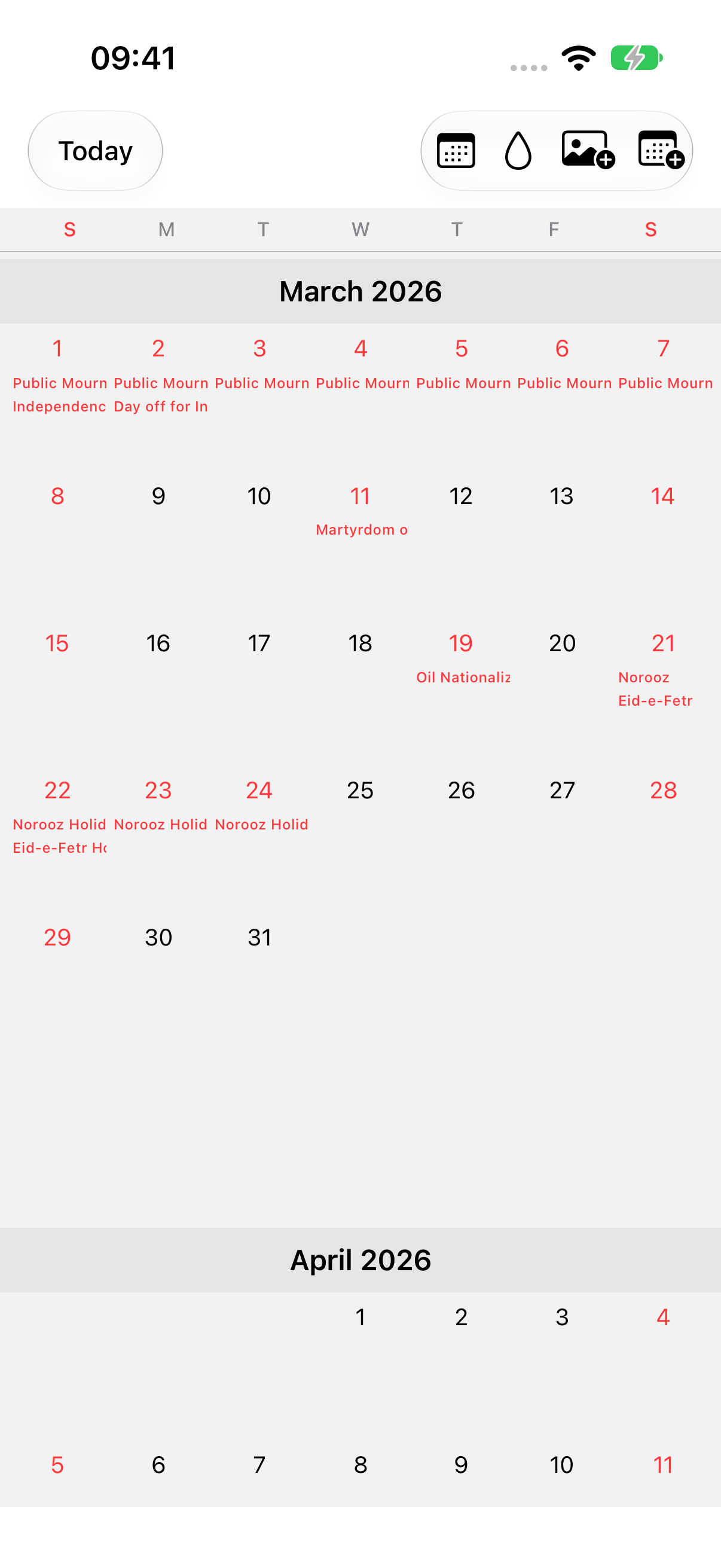
In OurDay’s month view, a holiday turns the date red and prints the holiday’s name under it, exactly as the provider writes it. Take March: Korea’s Independence Movement Day on the 1st and its substitute day off on the 2nd sit at the top of the month, and later in the same month Iran’s Nowruz holidays run in the same type. There is no country badge; tap the day and it tells you which calendar the holiday came from, such as the Korean holiday calendar.
Your plans, your shared plans and your partner’s plans stay right beside them. Write ‘Visit family’ over the other country’s long weekend and ‘Video call’ on a Saturday you are both off, and the holiday and the promise read in the same cell.
03
Set it once, on this phone
Go to Settings → Calendar Integration → Holiday calendars and turn holidays on. The app asks for calendar access, then finds the holiday calendar already in Apple Calendar and shows it. Your personal calendars stay off.
Add your partner’s country from ‘Add holidays’ on the same screen and search for it. On iPhone, the Calendar app asks you to confirm the subscription; once it has synced, the holidays appear in OurDay. If they don’t show yet, tap ‘Check again’. On Android, OurDay reads the country’s holidays once Google Calendar has synced them to the device.
Dates and names belong to the calendar provider; OurDay reads them and shows them. A country the provider publishes no holiday calendar for cannot be added, and the app says so. The choice is saved on your device only. If your partner wants both countries too, they set it up once on their phone.[4][5][6]
04
A red day isn’t automatically a day off for two
Seeing a holiday doesn’t mean your partner is free that day. Workplaces and schools differ by country and by household. Treat the holiday as a good day to ask ‘Could we meet around then?’, and ask whether they are really off.
Once you’ve agreed, write the day down as a shared event. Holidays are reference information on each person’s device; a shared event is a promise that shows up on your partner’s phone too. Before booking flights, check both people’s leave and both families’ plans once more.
05
Frequently asked questions
Does the country I add show up on my partner’s phone?
No. Holiday settings are saved on each device only. If your partner wants the same country, they add it once on their phone. Plans you agree on show on both phones when you save them as shared events.
Can I add any country?
Only countries for which the calendar provider publishes a holiday calendar. A country can appear in search and still be unavailable; the app tells you when that happens.
06
Official guidance we checked
Your plans, on top of both countries’ red days
Once your partner’s holidays appear, write down your next visit and the family trip together.